
Premium Codes — full MQL5 source code for MetaTrader 5

How it works
Add to cart
Pick a product below and add it to your cart. Your cart appears further down this page.
Choose your coin
Checkout hands you to NOWPayments. BTC, USDT, ETH, LTC and 300+ other assets are accepted.
Send the payment
Send the exact amount shown. NOWPayments notifies the store automatically the moment the network confirms.
Download instantly
Your order completes itself and the link unlocks — on the confirmation page, in your email receipt, and under My Account.
Available now
Each product is the complete .mq5 source with a lifetime licence. Pay once in crypto and the download unlocks as soon as the network confirms.
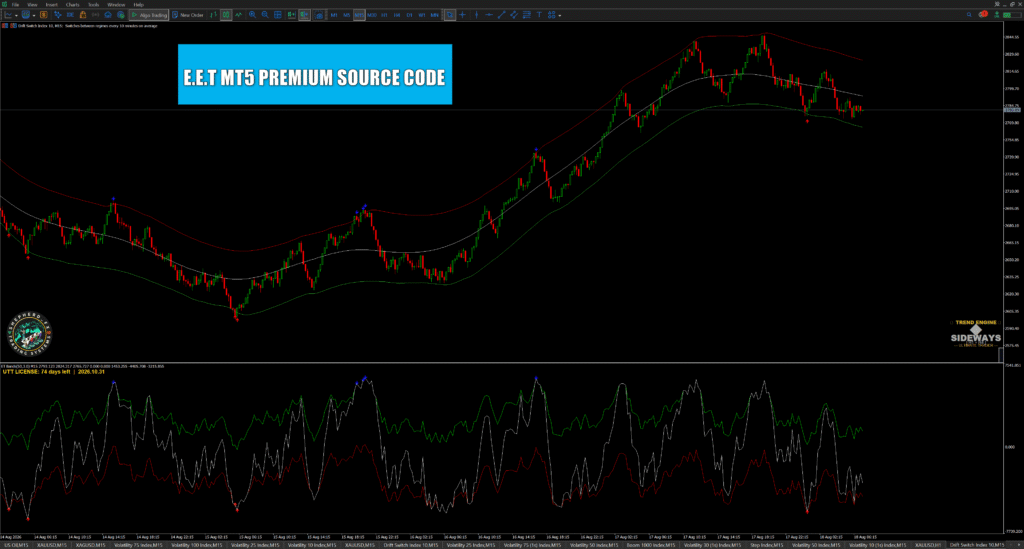
E.E.T Complete Source Pack — Main Window + Indicator Window Editions (Both MQL5 Files)
Get both Entry & Exit Timer source codes in a single purchase — the Main Window edition that draws elastic bands and momentum arrows straight over price, and the Indicator Window edition that runs the multi-timeframe engine in its own panel below the chart. Two complete, unobfuscated .mq5 files for the price of one.
Read the full description
Two editions. One purchase. Half price.
This is the complete Entry & Exit Timer source package. You are not choosing between the two builds — you get both, as full readable .mq5 source files, for $30 instead of $60.
What lands in your download
1. Main Window Edition — renders directly over your candles. Adaptive premium and discount bands that expand and contract with volatility, momentum-filtered entry arrows, and the Trend Engine regime panel reading TREND or SIDEWAYS so you can stand aside when conditions do not suit. Eleven buffers, eight plots, with DRAW_NONE state buffers exposed so your own EA can read the signal through iCustom.
2. Indicator Window Edition (Elastic MTF) — loads in its own panel beneath the chart and adds the full multi-timeframe engine. Pick any applied timeframe and the bands, middle line and arrows compute on that timeframe, then project onto whatever chart you are viewing. Arrows lock at first observation and stay non-repainting for the trading day. Popup, sound and MetaQuotes mobile push alerts, with de-duplication so one signal never fires twice.
Why both, rather than one
They were built to run as a pair. The Indicator Window edition sets your higher-timeframe bias while the Main Window edition times the entry on your execution chart — exactly the M15 / H1 pairing shown in the product image. Running only one half works, but you lose the confluence the pair was designed around.
Also in the ZIP
A written setup guide covering the MetaEditor compile step, the X64 Regular build target that stops the ‘your CPU architecture does not allow to run the file’ error, how to load the compiled .ex5 onto a chart, recommended timeframes and markets, mobile push alert setup, and a troubleshooting section for the errors people actually hit.
Licence
Single-developer lifetime licence on both files. Read them, modify them, compile them, and build them into your own EAs and private tools. No renewal, no licence server, no expiry. You may not resell or republish the source itself.
Delivery
Pay in crypto through NOWPayments — BTC, USDT, ETH, LTC and 300+ other assets. The moment the network confirms, your order completes itself and the download unlocks: on the confirmation page, in your email receipt, and under My Account → Downloads. Unlimited re-downloads, no expiry.
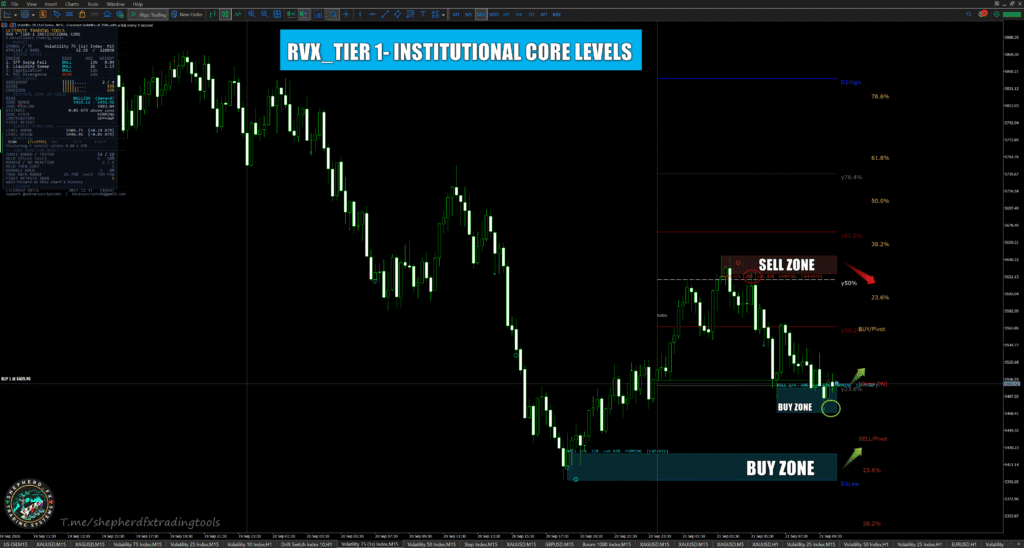
RVX Tier-1 Institutional Core — MT5 Four-Engine Reversal Zone Indicator (Full Source, Lifetime)
Four independent engines - swing failure, liquidity sweep, capitulation and RSI divergence - must agree before a reversal zone is armed. Add it to your existing strategy as confirmation for precise first-retest entries with a tight, objective stop.
Read the full description
Most traders do not have an entry problem. They have a confirmation problem. The setup is right, the direction is right, and the trade still gets stopped out because it was taken a few candles early, in the middle of a move, with the stop sitting somewhere arbitrary. RVX Tier-1 Institutional Core fixes the part that decides whether a good idea becomes a good trade: it shows you the exact price zone where a reversal is most likely to be defended, and it tells you precisely when that zone has failed.
Four independent engines, one zone
RVX runs four separate reversal detectors, each reading a different dimension of the market. A Swing Failure Pattern engine reads structure – price taking out a swing high or low and failing to hold beyond it. A smart-money liquidity sweep engine reads order flow – the stop runs that clear resting liquidity before a turn. A Vix-Fix capitulation and snapback engine reads volatility – the panic extremes where sellers or buyers exhaust themselves. An RSI smart divergence engine reads momentum – price pushing further while the force behind it fades.
Each engine casts a vote on a price level. Votes are clustered by price using ATR, so they do not need to land on the same candle – only in the same zone while their opinions are still alive, with every vote decaying on an exponential half-life. By default all four engines must agree before a zone is armed. That is a deliberately high bar, and it is why RVX zones are rare and why they matter when they print. Opposing votes that land inside a zone count against it, so a level both sides are fighting over is marked down rather than drawn with false confidence.
How to add it to the strategy you already trade
RVX is built to sit underneath your existing method, not replace it. Keep your own analysis for direction and context – trend, structure, supply and demand, SMC, ICT, price action, whatever you already trust. Use RVX for the two things most strategies are weakest at: where exactly to enter, and where exactly you are wrong.
When your strategy points long and RVX has armed a bullish zone in the same area, you have independent confirmation from four engines that the level is likely to be defended. When your setup and RVX disagree, you have a reason to stand aside. Traders who add a confluence filter like this typically take fewer trades – and that is the point.
The sniper entry, step by step
1. Zone formed. RVX alerts the moment a bullish or bearish zone is armed. This is your level – nothing to do yet.
2. Price leaves. A genuine retest needs price to move away first. RVX requires price to depart the zone by a set ATR distance and a minimum number of candles to close, so a candle drifting sideways inside the zone is never mistaken for a test.
3. First retest. When price returns to the zone for the first time, RVX alerts again. This is the entry. First retests of fresh confluence zones are where the cleanest reactions tend to happen, because the liquidity behind the level has not yet been used up.
4. The stop. Place your stop just beyond the far edge of the zone. Because zones are sized in fractions of ATR, that stop is tight – which is what makes these entries low-risk relative to the reward on offer.
An objective stop, not a guess
The trade is invalidated when a full candle closes beyond the zone. RVX applies exactly this rule to itself: in its default Full Body mode, a zone is only considered broken when both the open and the close of a candle sit beyond the edge. A wick that pokes through is not a break. A candle that opens inside and closes a tick outside is not a break. When a full body clears the level, RVX greys the zone and marks the candle that killed it, so there is never any doubt about whether your level is still valid. No moving your stop, no hoping, no second-guessing.
It audits its own performance
Every zone is tracked to resolution – held, or broken – and RVX reports its hold rate on the instrument and timeframe you are actually trading, with a Wilson score confidence interval rather than a raw percentage. Until twenty zones have resolved it tells you the sample is too small to mean anything. You do not have to take the tool on trust; it shows you, on your own chart, how often its levels have held.
Alerts and dashboard
Three alerts – zone formed, first retest and zone broken – delivered by terminal pop-up, push notification to your phone and e-mail, so you can leave the chart and still catch the entry. A workflow dashboard shows the state of every zone, the engine votes behind it and the audit statistics, with a compact mode when you want a clean chart.
Built for
Deriv synthetic indices, gold and forex on MetaTrader 5, with tick volume as the recommended volume source for synthetics and CFDs, and real volume available for futures and equities. Works on every timeframe; M5 to H1 is where most traders will use it for entries, with higher timeframes for mapping the levels that matter most.
What you get
The complete, unobfuscated MQL5 source code – every engine, every threshold, every line. This is the full paid build: lifetime licence, no expiry, no renewal, no account lock. Compile it in MetaEditor, adapt it to your own rules, or read exactly how each engine decides. The dashboard confirms it at a glance, reading LICENCE: LIFETIME – FULL SOURCE.
Delivery
Pay with crypto through NOWPayments. Your download is released automatically the moment the payment is confirmed on the blockchain – it appears on the order confirmation page, in your confirmation e-mail and in My Account under Downloads. No waiting for manual approval.
Trading carries substantial risk. RVX is an analysis tool: it maps levels and flags when they fail, but it does not place trades, and no level holds every time. Always test on a demo account first, size your position to the stop, and never risk money you cannot afford to lose. Nothing here is financial advice.
🛒 Your cart
Your cart is empty. Pick an edition above and it will appear here.
What you get with every product
- The complete .mq5 source — every buffer, every input, every calculation. Nothing stripped, nothing obfuscated.
- A single-developer lifetime licence — read it, modify it, compile it, and ship it inside your own tools. No expiry and no licence server. Resale or republication of the source itself is not permitted.
- Unlimited re-downloads — no download cap, no expiry window. The link stays valid on your order forever.
- The E.E.T pack also includes both editions (Main Window and Indicator Window), a written setup guide covering installation, compiling, recommended markets and mobile alerts, and the X64 Regular build note — the most common reason a compiled MQL5 file refuses to run.
Questions
How fast do I actually get the file?
As fast as the blockchain confirms. NOWPayments sends the store a confirmation callback the moment your transaction is finalised; because these products are virtual and downloadable, the order marks itself complete and the download unlocks straight away. Typical wait is a few minutes — faster on USDT (TRC-20) than on BTC.
Do I need an account to buy?
No. Guest checkout is on. Just use an email address you can actually open, because your download link is also sent there. Creating an account is optional but gives you a permanent Downloads page.
Is this the source, or just a compiled indicator?
It is the source. You receive the .mq5 text file, not an .ex5 binary. You compile it yourself in MetaEditor, which means you can read the logic, change the defaults, and build it into your own EAs.
Which MetaTrader version?
MetaTrader 5 only. Every premium product is MQL5 and uses MT5-native indicator buffers.
What if my payment underpays or arrives late?
NOWPayments records the transaction against your invoice either way. If a payment lands short or after the invoice window, message the Telegram support account below with your order number and transaction hash and it will be reconciled manually.
Can I get a refund?
Source code cannot be un-delivered once downloaded, so completed downloads are final. If a file will not compile or does not match its description, contact support first — the problem gets fixed or the order gets refunded.
Support
Telegram channel: t.me/Ultimate_Trading_Tools · Direct: @ubinaryscripts101 · Email: binaryscript101@gmail.com